Physical Address
304 North Cardinal St.
Dorchester Center, MA 02124
Physical Address
304 North Cardinal St.
Dorchester Center, MA 02124

Artificial intelligence has become one of the most talked-about technologies in recent years. From helping people write emails to answering questions and generating ideas, AI-powered tools are changing how we work and communicate.
One tool that has gained massive popularity is ChatGPT. Millions of people use it every day for learning, productivity, content creation, coding assistance, research, and much more.
If you are new to AI and wondering what ChatGPT actually is, how it works, and whether it can be useful in your daily life, this guide will explain everything in simple English.
By the end of this article, you will understand the basics of ChatGPT, its advantages, limitations, and how beginners can start using it effectively.
ChatGPT is an AI-powered chatbot that can understand questions and respond in a natural conversational style.
Instead of searching through multiple websites to find information, users can simply ask a question and receive an instant answer.
The name ChatGPT comes from:
It is designed to understand human language and generate responses that sound natural and helpful.
People use ChatGPT for:
It works through text conversations, making it feel similar to chatting with a knowledgeable assistant.
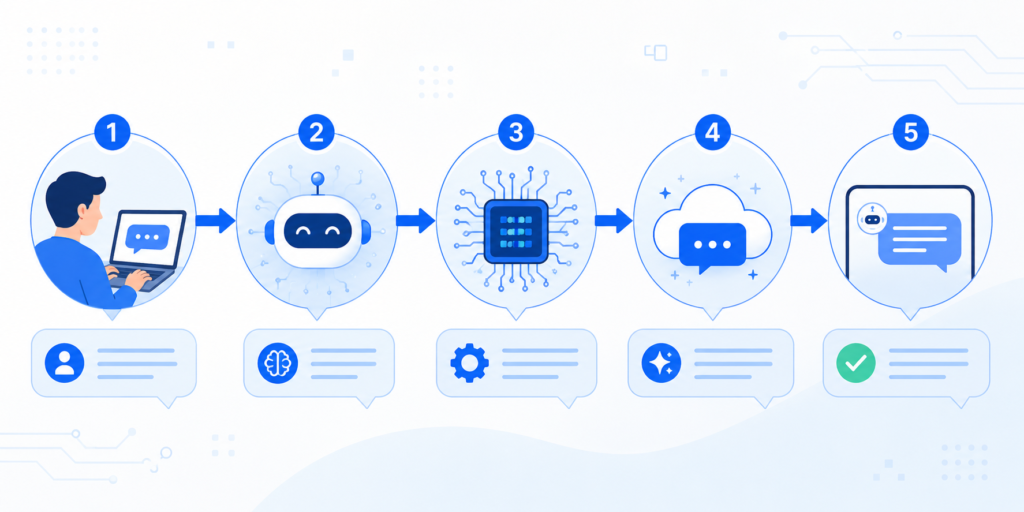
To understand ChatGPT, it helps to look at the process step by step.
Before ChatGPT can answer questions, it is trained using a huge collection of text from books, articles, websites, and other educational sources.
During training, it learns:
This allows it to predict what words should come next in a response.
When you type a message, ChatGPT analyzes the text to understand:
For example:
If you ask:
“How do I create a Gmail account?”
The system identifies:
Then it prepares a relevant response.
After understanding your question, ChatGPT generates a response one word at a time.
It predicts which words are most likely to create a useful answer based on patterns learned during training.
This process happens very quickly, often within seconds.
One reason ChatGPT feels natural is that it can remember parts of the conversation while chatting.
For example:
User:
“I want to start a blog.”
Later:
“What platform should I use?”
The system understands that “platform” refers to blogging platforms because of the earlier context.
This creates a smoother conversation experience.
ChatGPT includes many useful features that make it popular among different types of users.
It responds in a conversational style that feels easy to understand.
Users can ask questions about many different topics.
It can help generate:
Students often use it to understand difficult concepts.
Developers use it for:
Long articles or documents can be summarized into shorter versions.
It can help translate text between many languages.
Useful for generating ideas for projects, businesses, marketing campaigns, and more.

ChatGPT offers several practical advantages.
Instead of searching through multiple websites, users can get quick answers in one place.
Tasks like writing emails, creating outlines, and summarizing content become faster.
Students can receive simplified explanations of difficult topics.
For example:
A complex science concept can be explained in beginner-friendly language.
Unlike human tutors or consultants, ChatGPT can be accessed at any time.
Writers, marketers, and entrepreneurs use it to generate ideas and overcome creative blocks.
Professionals in education, marketing, software development, customer support, and business can all benefit from it.
Although ChatGPT is useful, it is not perfect.
Understanding its limitations is important.
Sometimes responses may contain mistakes or outdated information.
Always verify important facts from trusted sources.
While it understands language patterns well, it does not think like a human.
It predicts responses based on data and patterns.
If a question is unclear, the answer may not match the user’s intent.
Providing detailed instructions usually improves results.
For legal, financial, or medical decisions, professional advice should always be considered.
Users should avoid sharing sensitive personal information in conversations.

Let’s look at practical examples.
A student asks:
“Explain photosynthesis in simple words.”
The tool provides an easy-to-understand explanation.
A professional writes:
“Create a polite email requesting a meeting.”
The system generates a draft that can be edited and sent.
A blogger asks:
“Give me 20 blog topic ideas about fitness.”
The tool quickly generates ideas.
A beginner programmer asks:
“What does this Python error mean?”
The system explains the error and possible fixes.
A business owner uses ChatGPT for:
If you are a beginner, follow these steps.
Visit the official platform and create an account.
Sign in using your account credentials.
Open a new conversation.
Instead of writing:
“Help me”
Try:
“Help me create a weekly study schedule.”
Specific prompts produce better results.
Read the answer carefully.
If needed, ask follow-up questions.
For better results, provide more details.
Example:
“Write a professional email for a job application.”
is better than:
“Write an email.”
Double-check critical information from trusted sources.
Many beginners make these mistakes.
Detailed questions usually produce better answers.
Always verify important facts.
Avoid sharing passwords, banking details, or confidential data.
Conversation-based interaction often produces better results.
The tool is helpful but not flawless.
Providing background information improves response quality.
There are both free and paid versions available depending on the platform and features offered.
Not entirely. It can provide direct answers, but search engines remain important for finding sources and current information.
Yes. It can help explain concepts, summarize information, and support learning.
Yes. It can assist with drafts, outlines, and content creation.
No. It can make mistakes and may not always have the latest information.
Yes. Many developers use it for coding assistance and learning.
Yes. It can be used through mobile apps and web browsers.
Yes. Businesses use it for customer support, content creation, and productivity tasks.
Yes. It can understand and generate text in many languages.
Yes. Important information should always be checked using reliable sources.
ChatGPT is one of the most popular AI-powered tools available today. It helps people answer questions, learn new skills, create content, write emails, brainstorm ideas, and improve productivity.
Its biggest advantage is making information and assistance more accessible through simple conversations.
However, it is important to remember that ChatGPT is a tool, not a replacement for expert advice or independent research. Users should verify important information and use it responsibly.
For beginners, ChatGPT can be an excellent introduction to artificial intelligence and a practical assistant for everyday tasks.

