Physical Address
304 North Cardinal St.
Dorchester Center, MA 02124
Physical Address
304 North Cardinal St.
Dorchester Center, MA 02124


If you save photos on your phone, work documents on your laptop, and important files on a USB drive, you’ve probably experienced the frustration of not having the file you need when you’re using another device. Cloud storage was created to solve exactly this problem.
Instead of storing files only on one computer or phone, cloud storage keeps your data on secure internet-connected servers. This allows you to access your files from almost anywhere using a compatible device and an internet connection.
Today, millions of students, professionals, businesses, and everyday users rely on cloud storage to back up important documents, share files with others, and keep data synchronized across multiple devices.
In this guide, you’ll learn What Is Cloud Storage, how it works, its advantages, limitations, and how to choose the right cloud storage service for your needs.
Cloud storage is a service that allows you to store digital files on remote servers instead of keeping them only on your computer, smartphone, or external hard drive.
These remote servers are managed by cloud service providers that maintain secure data centers around the world.
When you upload a file, it is stored safely online and can be accessed later from any supported device after you sign in to your account.
For example, if you upload a presentation from your office computer, you can later open the same file on your laptop at home or your smartphone while traveling.
This convenience is one of the biggest reasons cloud storage has become so popular.
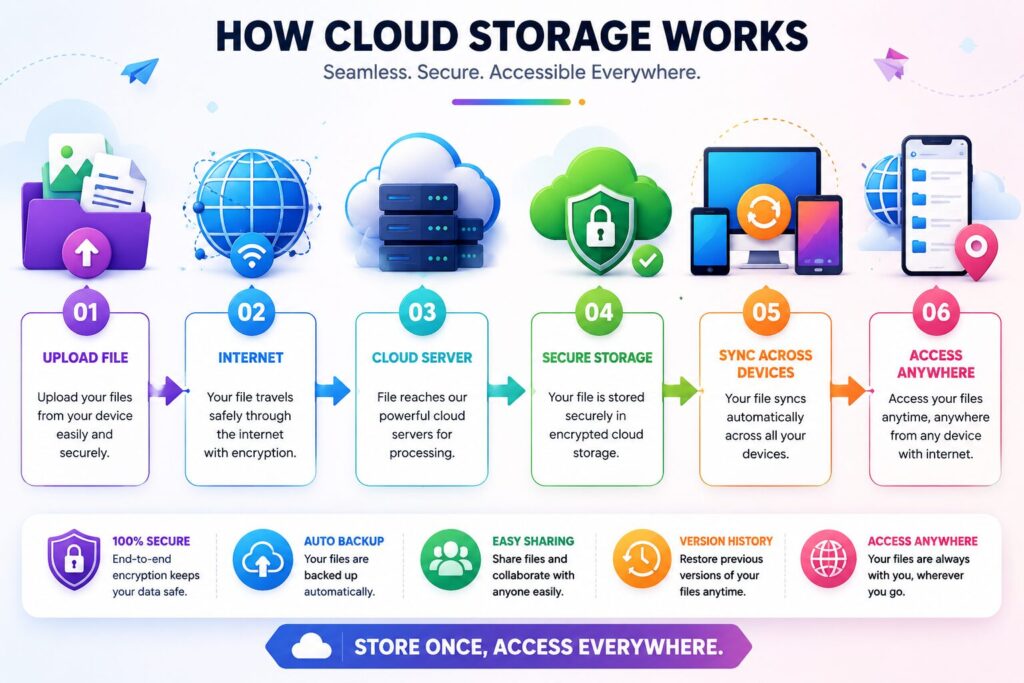
Although cloud storage appears simple, several technologies work together behind the scenes.
When you save a document, photo, or video to your cloud account, your device sends the file over the internet.
The cloud provider stores your file on secure servers located inside professional data centers.
If synchronization is enabled, the latest version of the file becomes available on your other connected devices.
Whenever you sign in from another device, your files are available without needing to manually transfer them.
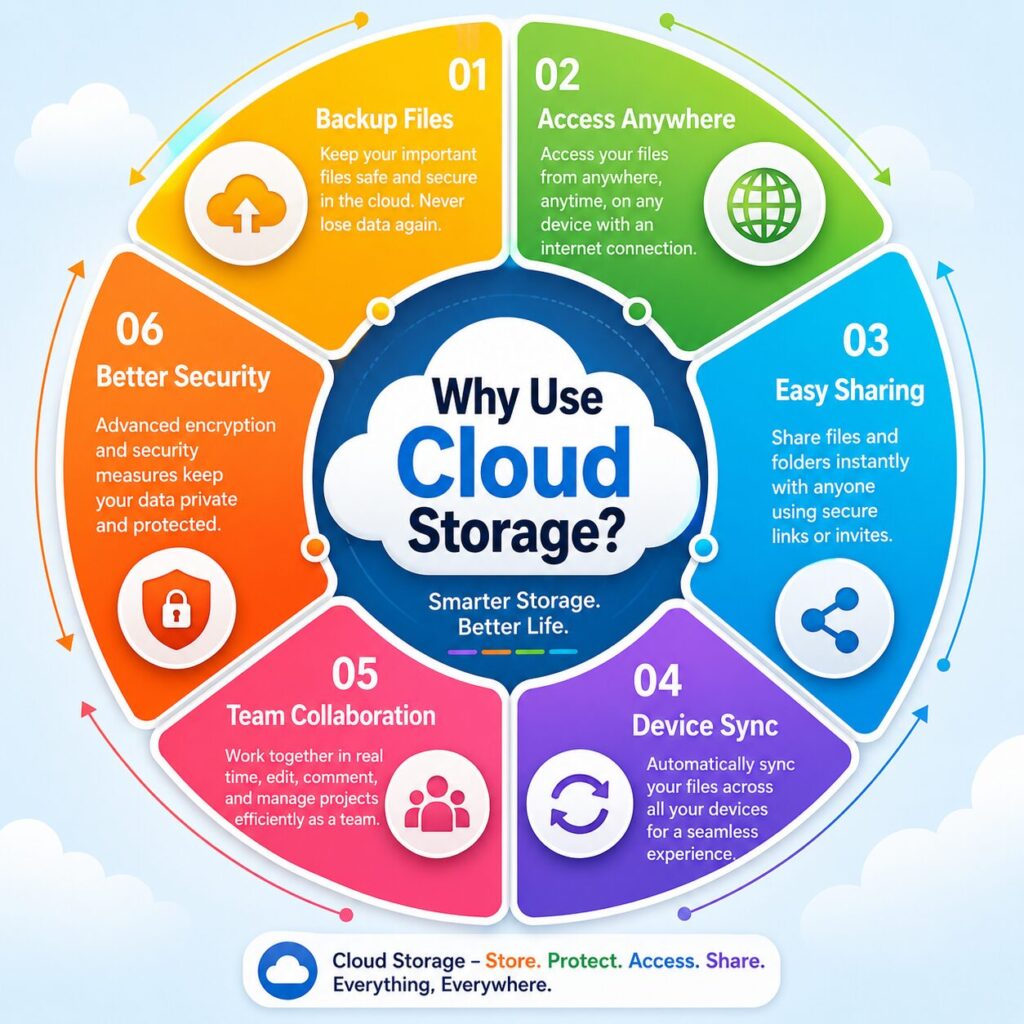
Cloud storage offers much more than extra storage space.
It helps users:
For both personal and business use, it has become one of the most valuable internet technologies.
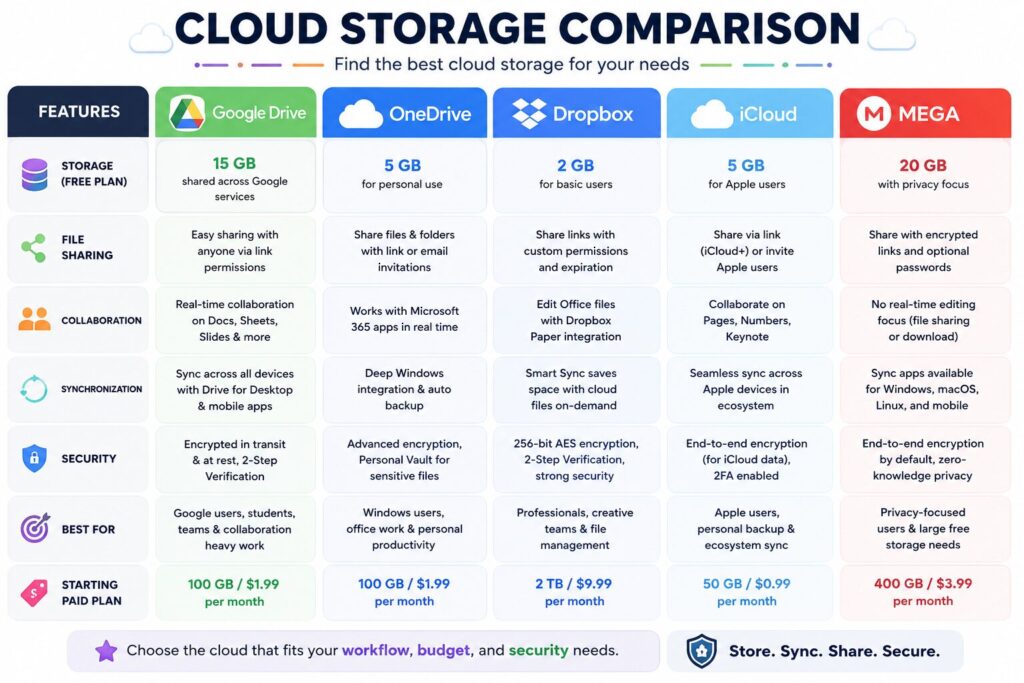
| Service | Best For | Free Storage | File Sharing | Device Sync |
|---|---|---|---|---|
| Google Drive | General Users | Yes | ✅ | ✅ |
| OneDrive | Windows Users | Yes | ✅ | ✅ |
| Dropbox | Team Collaboration | Yes | ✅ | ✅ |
| iCloud | Apple Users | Yes | ✅ | ✅ |
| MEGA | Privacy Focus | Yes | ✅ | ✅ |
One of the biggest reasons people choose cloud storage is convenience. Instead of worrying about carrying a USB drive or emailing files to yourself, your documents are available whenever you need them.
Whether you’re at home, in the office, or traveling, you can open your files from any supported device after signing in to your account.
This flexibility is especially useful for students, remote workers, and business owners.
Many cloud storage services automatically back up your files.
If your computer crashes or your phone is lost, your documents remain safely stored in the cloud and can be restored after you sign in to a new device.
Cloud storage makes sharing files simple.
Instead of attaching large files to emails, you can generate a secure sharing link and send it to colleagues, friends, or clients.
Some services also let you control whether other people can only view a file or edit it.
Many cloud platforms allow multiple people to work on the same document simultaneously.
For example, a team preparing a presentation can edit different sections without creating multiple copies of the same file.
Most cloud storage services allow you to create folders, search for files quickly, and organize documents by project, client, or category.
This reduces clutter and makes file management much easier.
If you need more space, most providers allow you to upgrade your storage plan without purchasing new hardware.
Many beginners wonder whether cloud storage is better than storing files directly on a computer.
The answer depends on your needs.
| Feature | Cloud Storage | Local Storage |
|---|---|---|
| Access Anywhere | ✅ | ❌ |
| Internet Required | Usually Yes | No |
| Automatic Backup | Available | Manual |
| Device Synchronization | ✅ | ❌ |
| Hardware Failure Protection | ✅ | ❌ |
| One-Time Hardware Purchase | ❌ | ✅ |
For most users, combining both methods provides the best balance of convenience and reliability.
Security is one of the most common concerns about cloud storage.
Reputable providers invest heavily in protecting user data through multiple security measures.
These often include:
Although providers work hard to protect user accounts, security also depends on your own habits.
Use a strong password, enable two-factor authentication, and avoid sharing account credentials with others.
Cloud storage is useful in many everyday situations.
Students use cloud storage to save assignments, presentations, research notes, and study materials.
Freelancers often share project files with clients and keep backups of important work.
Businesses store invoices, contracts, reports, and marketing materials while allowing employees to collaborate securely.
Families use cloud storage to organize photos, videos, and important personal documents in one place.
Before creating an account, compare the following features.
Check how much free storage is included and whether affordable upgrades are available.
Choose a service that works well with the devices you use every day.
If you regularly collaborate with others, look for services with flexible sharing permissions.
Enable two-factor authentication and review the provider’s privacy and security features.
Compare free and paid plans to ensure they fit your budget and storage requirements.
Avoid these common cloud storage mistakes:
Following simple security practices can help keep your files protected.
Cloud storage is an online service that stores your files on secure remote servers so you can access them from different devices.
Most providers offer a free plan with limited storage. Additional space is usually available through paid subscriptions.
You can often access files that have been downloaded for offline use, but syncing and uploading new files generally require an internet connection.
The best option depends on your needs. Google Drive, OneDrive, Dropbox, iCloud, and MEGA are all popular choices with different strengths.
Trusted providers use encryption and other security features, but users should also enable two-factor authentication and use strong passwords.
Cloud storage is excellent for accessibility and backups, but many people still keep local copies of important files for extra protection.
The amount varies by provider and can change over time, so it’s best to check the latest plans before choosing a service.
Many services move deleted files to a recycle bin or trash folder for a limited time, allowing you to restore them if needed.
Understanding What Is Cloud Storage is an important step toward managing your digital files more efficiently. Instead of relying on a single computer or external drive, cloud storage gives you the flexibility to access documents, photos, and other important data from almost anywhere.
Whether you’re a student organizing coursework, a freelancer working with clients, or a business owner managing company files, cloud storage can improve productivity while reducing the risk of losing valuable information.
The key is choosing a trusted provider, organizing your files properly, and following good security practices. When used correctly, cloud storage becomes more than just an online folder—it becomes a reliable tool for backup, collaboration, and everyday digital life.
This article is published by Tivorenza.com to help readers understand technology in a simple and practical way. We regularly update our guides to ensure they remain accurate, beginner-friendly, and useful for everyday internet users.


[…] traditional cloud computing, where nearly all processing happens in centralized data centers, edge computing […]
[…] you’ve probably looked for a better storage solution. While external hard drives and cloud storage are popular choices, there’s another option that’s becoming increasingly common in […]
[…] Cloud storage is helpful, but it’s still a good idea to keep another backup on an external drive or another trusted storage location. […]