Physical Address
304 North Cardinal St.
Dorchester Center, MA 02124
Physical Address
304 North Cardinal St.
Dorchester Center, MA 02124

Have you ever received a notification saying someone tried to sign in to your email or social media account? Unfortunately, passwords alone are no longer enough to protect online accounts. Data breaches, phishing scams, and weak passwords make it easier for attackers to gain unauthorized access.
This is where Two-Factor Authentication (2FA) becomes one of the most effective security tools available. Instead of relying only on a password, 2FA requires an additional verification step before access is granted.
Whether you use online banking, email, cloud storage, or social media, enabling two-factor authentication can significantly improve your account security.
In this guide, you’ll learn What Is Two-Factor Authentication, how it works, the different types of verification methods, and why every internet user should enable it.
Two-Factor Authentication, commonly known as 2FA, is a security method that requires two separate forms of identity verification before allowing access to an account.
Instead of asking only for a password, the system requests a second verification factor.
This second factor could be:
Even if someone steals your password, they still need the second verification factor to access your account.
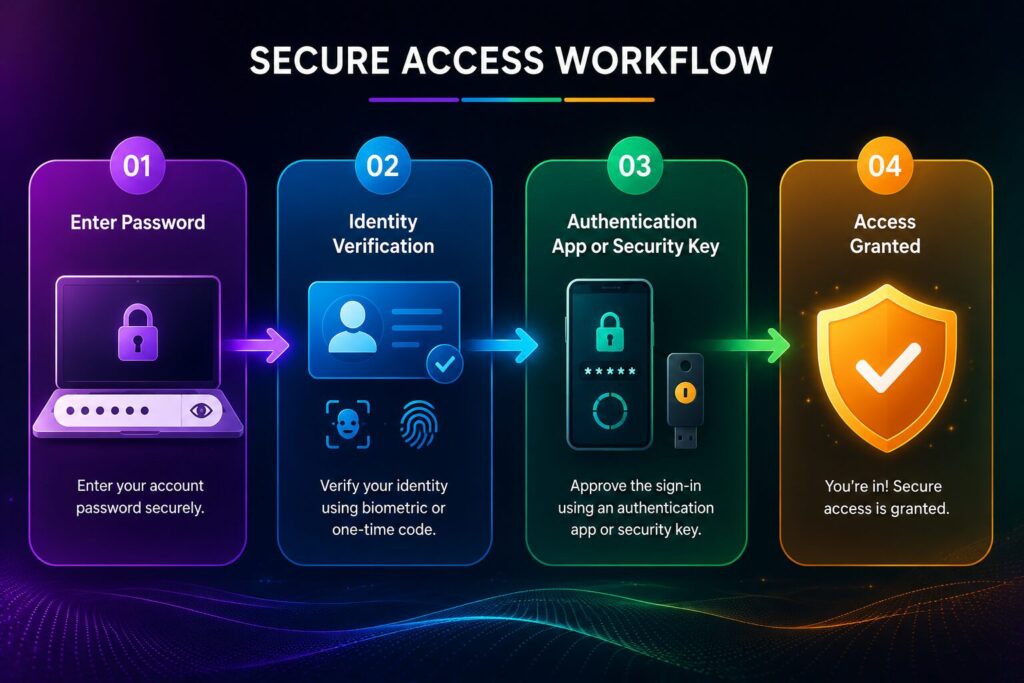
Most 2FA systems follow a simple process.
Enter your username and password.
The website requests a second verification factor.
You approve the login using an authentication app, security key, biometric verification, or one-time code.
The website confirms your identity and grants access.
Because two separate verification methods are required, unauthorized access becomes much more difficult.
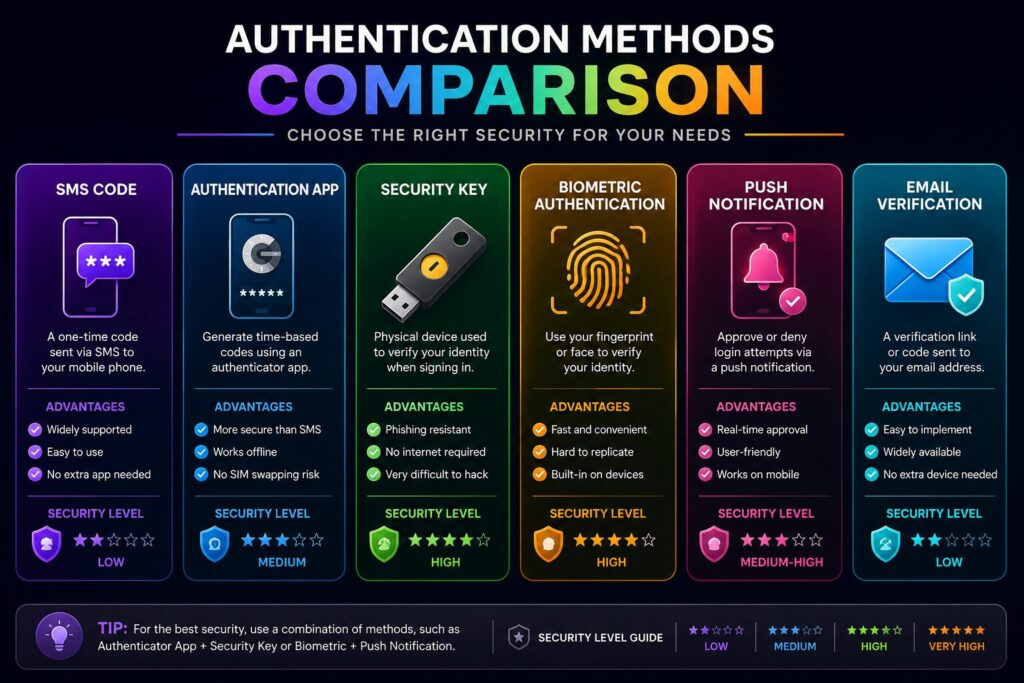
Several types of 2FA are available today.
| Method | Security | Convenience |
|---|---|---|
| SMS Verification | Good | Very Easy |
| Authentication App | Excellent | Easy |
| Security Key | Outstanding | Moderate |
| Fingerprint | Excellent | Very Easy |
| Face Recognition | Excellent | Very Easy |
| Push Notification | Excellent | Easy |
Each method offers a different balance between convenience and security.
Passwords can be:
Two-Factor Authentication adds another layer of protection, making it much harder for attackers to compromise your accounts.
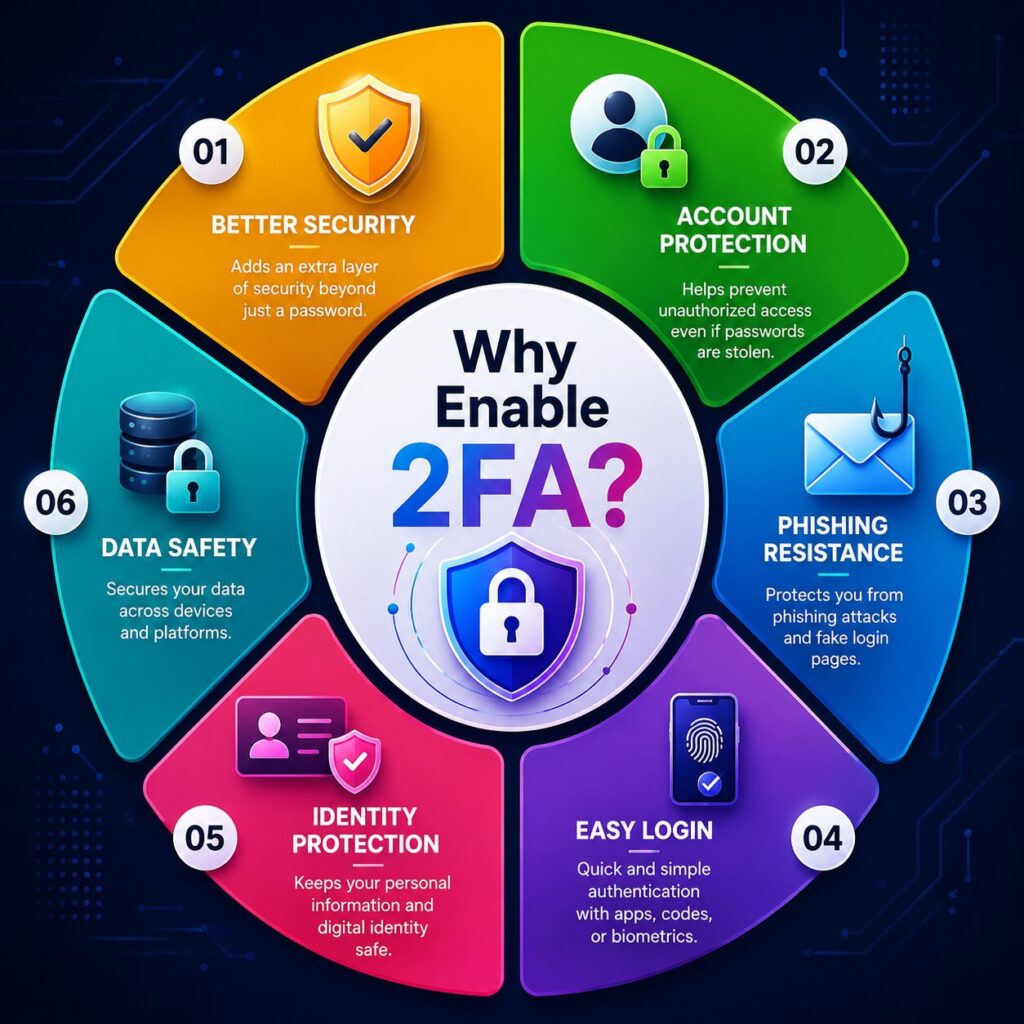
Enabling Two-Factor Authentication (2FA) is one of the simplest ways to improve your online security. It takes only a few minutes to set up, but it can prevent many common types of cyberattacks.
Even if your password is exposed in a data breach, attackers still need the second verification factor to sign in.
This significantly reduces the chances of unauthorized access.
Phishing websites often trick users into entering their passwords.
With 2FA enabled, the stolen password alone usually isn’t enough to access your account because the attacker also needs your second authentication factor.
Many online accounts contain sensitive information such as:
Adding an extra security layer helps protect this data from unauthorized access.
Small businesses often use cloud services, accounting software, and collaboration platforms.
Enabling 2FA for employees helps reduce the risk of account compromise.
Modern authentication methods such as fingerprint scanning, facial recognition, or push notifications make 2FA both secure and convenient.
After the initial setup, verification usually takes only a few seconds.
Many users wonder which verification method offers the best protection.
| Feature | SMS Code | Authentication App |
|---|---|---|
| Internet Required | No | Usually No |
| Mobile Network Required | Yes | No |
| Phishing Protection | Good | Better |
| SIM Swap Protection | No | Yes |
| Reliability While Traveling | Moderate | Excellent |
| Overall Security | Good | Excellent |
Authentication apps are generally considered more secure than SMS verification because they are less vulnerable to SIM-swapping attacks.
Several trusted authentication apps are available for Android and iPhone users.
Some popular options include:
These apps generate temporary verification codes that change every few seconds.
Many also support encrypted backups, making it easier to recover your accounts when switching to a new phone.
Although the exact steps vary between websites, the general process is similar.
Sign in to your account.
Open the Security or Privacy settings.
Locate the Two-Factor Authentication or 2-Step Verification option.
Choose your preferred verification method.
Complete the setup process.
Save the backup or recovery codes in a secure location.
Test the new login method before signing out.
Many users unintentionally reduce the effectiveness of 2FA.
Avoid these common mistakes:
Good security depends on both technology and safe habits.
Two-Factor Authentication is a security feature that requires two separate verification methods before allowing access to an account.
Yes. Most online services provide 2FA at no additional cost.
Authentication apps are generally considered more secure because they are less vulnerable to SIM-swapping attacks.
Some services allow multiple trusted devices, while others require additional setup. Check your account’s security settings for available options.
You can usually recover your account using backup codes, another trusted device, or account recovery options if they were configured in advance.
No. Traditional 2FA adds an extra verification step after your password. Some modern services also support passwordless methods such as passkeys.
It’s strongly recommended for important accounts such as email, banking, cloud storage, shopping, and social media.
While no security system is perfect, properly configured 2FA makes unauthorized access significantly more difficult than using a password alone.
To get the most protection from 2FA:
These small steps can greatly improve your overall online security.
Understanding What Is Two-Factor Authentication is one of the most important steps you can take to protect your online accounts. While strong passwords are still important, adding a second verification factor dramatically reduces the risk of unauthorized access.
Whether you use email, cloud storage, banking apps, shopping websites, or social media, enabling 2FA provides an extra layer of security that is easy to set up and quick to use. Authentication apps, security keys, and biometric verification all offer strong protection while keeping the sign-in process convenient.
As cyber threats continue to evolve, Two-Factor Authentication is no longer just an optional feature—it has become an essential part of good digital security. Taking a few minutes to enable it today can help protect your personal information for years to come.
This article is published by Tivorenza.com to help readers understand technology in a simple and practical way. We regularly update our guides to keep information accurate, beginner-friendly, and useful for everyday internet users.

