Physical Address
304 North Cardinal St.
Dorchester Center, MA 02124
Physical Address
304 North Cardinal St.
Dorchester Center, MA 02124


Creating a professional presentation used to take hours of designing slides, finding images, formatting layouts, and organizing content. Today, AI-powered presentation tools can generate attractive slides in just a few minutes based on a simple topic or prompt.
Whether you’re a student preparing a classroom project, a freelancer pitching a client, a teacher creating lesson material, or a business professional presenting reports, AI presentation makers can save valuable time while improving the overall design of your slides.
In this guide, we’ll compare the Best AI Presentation Makers available in 2026, explain their features, strengths, weaknesses, pricing, and help you choose the right tool for your workflow.
An AI presentation maker is software that uses artificial intelligence to help users create presentations faster.
Instead of designing every slide manually, these tools can:
Most tools still allow manual editing, giving users full control over the final presentation.
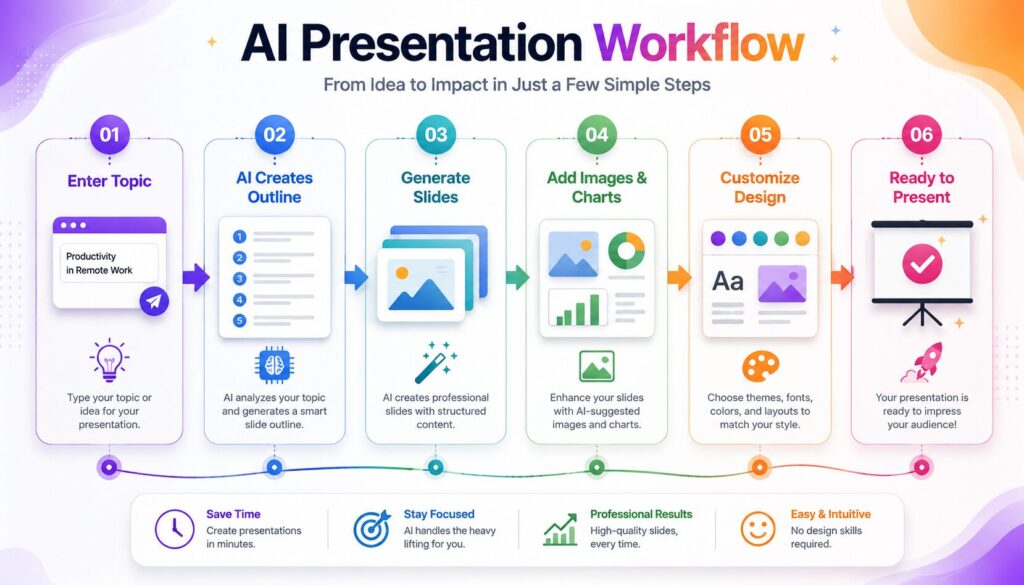
Although each platform works differently, the basic workflow is similar.
Enter your presentation topic.
The AI creates an outline with logical sections.
Slides are generated automatically.
The software adds layouts, icons, and suggested visuals.
You review, edit, and customize the presentation.
Export the finished presentation in your preferred format.
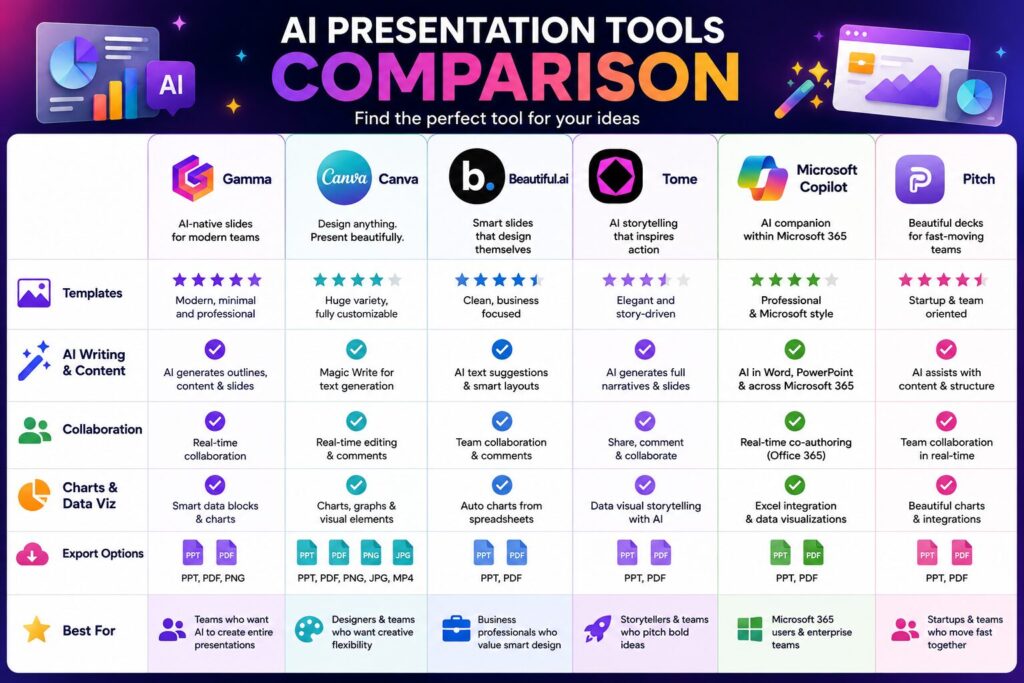
| Tool | Best For | Templates | Collaboration | Beginner Friendly |
|---|---|---|---|---|
| Gamma | Fast presentations | ⭐⭐⭐⭐⭐ | ✅ | ⭐⭐⭐⭐⭐ |
| Canva | Creative designs | ⭐⭐⭐⭐⭐ | ✅ | ⭐⭐⭐⭐⭐ |
| Beautiful.ai | Business presentations | ⭐⭐⭐⭐ | ✅ | ⭐⭐⭐⭐ |
| Tome | Storytelling | ⭐⭐⭐⭐ | ✅ | ⭐⭐⭐⭐ |
| Microsoft Copilot | Microsoft 365 users | ⭐⭐⭐⭐ | ✅ | ⭐⭐⭐⭐ |
| Pitch | Team collaboration | ⭐⭐⭐⭐ | ✅ | ⭐⭐⭐⭐ |
Gamma has become one of the most popular AI presentation tools because it focuses on creating modern, interactive presentations with minimal effort.
Canva combines AI-powered content generation with one of the largest template libraries available.
It is suitable for students, teachers, marketers, and small businesses that want visually attractive presentations without advanced design skills.
Beautiful.ai is designed primarily for business presentations. Its smart layout engine automatically adjusts slide elements as you add content, helping presentations maintain a clean and professional appearance.
Tome focuses on storytelling rather than traditional slide creation.
Instead of building presentations one slide at a time, it helps users create visually engaging narratives using AI-generated layouts, images, and structured content.
Microsoft Copilot integrates with Microsoft PowerPoint, helping users generate presentations directly inside familiar Office applications.
Users can quickly create outlines, summarize documents, and generate speaker notes without leaving PowerPoint.
Pitch is built for teams that regularly collaborate on presentations.
It combines presentation creation with commenting, shared workspaces, analytics, and real-time collaboration.
| Feature | Gamma | Canva | Beautiful.ai | Tome | Copilot | Pitch |
|---|---|---|---|---|---|---|
| AI Content Generation | ✅ | ✅ | ✅ | ✅ | ✅ | Limited |
| Templates | ⭐⭐⭐⭐ | ⭐⭐⭐⭐⭐ | ⭐⭐⭐⭐ | ⭐⭐⭐ | ⭐⭐⭐⭐ | ⭐⭐⭐⭐ |
| Collaboration | ✅ | ✅ | ✅ | ✅ | ✅ | ⭐⭐⭐⭐⭐ |
| Charts | Good | Good | Excellent | Good | Excellent | Good |
| Export Options | Good | Excellent | Good | Good | Excellent | Good |
| Ease of Use | ⭐⭐⭐⭐⭐ | ⭐⭐⭐⭐⭐ | ⭐⭐⭐⭐ | ⭐⭐⭐⭐ | ⭐⭐⭐⭐ | ⭐⭐⭐⭐ |
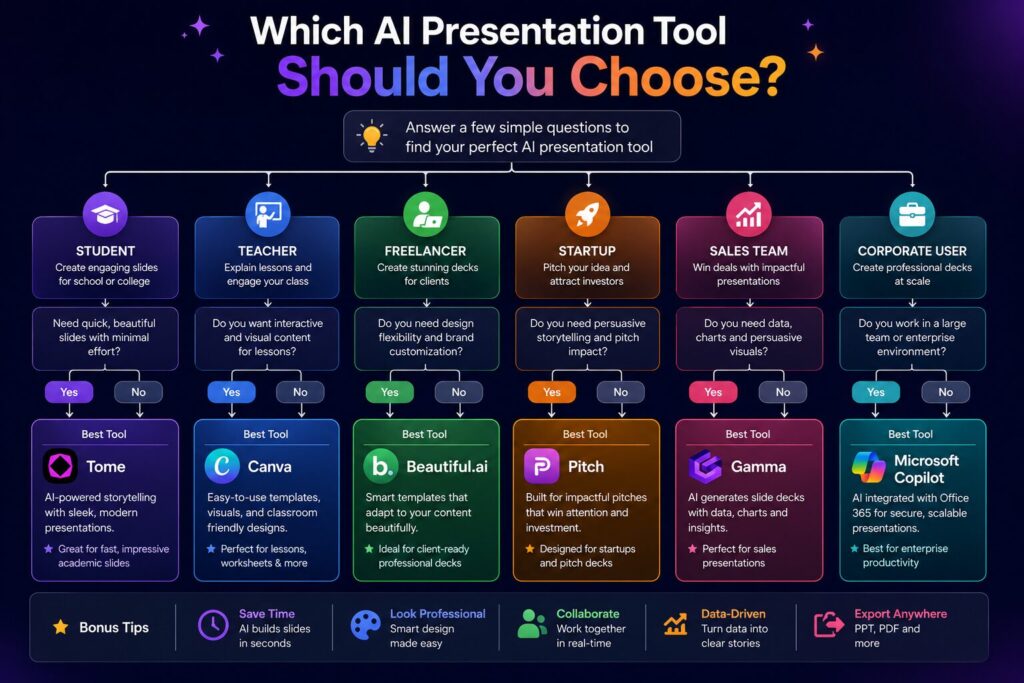
Choosing the right tool depends on how you create presentations.
| User Type | Recommended Tool |
|---|---|
| Student | Canva or Gamma |
| Teacher | Canva |
| Freelancer | Gamma |
| Startup Team | Pitch |
| Sales Team | Beautiful.ai |
| Corporate Professional | Microsoft Copilot |
| Content Creator | Tome |
If visual creativity is your priority, Canva is an excellent choice. If you want presentations generated quickly with minimal editing, Gamma performs exceptionally well. Business teams that already use Microsoft 365 may find Copilot the most convenient option.
AI presentation software offers several practical advantages.
Instead of designing every slide manually, AI creates a structured starting point within minutes.
Built-in templates and automatic layouts help presentations look more professional.
Many tools generate titles, bullet points, and slide outlines automatically.
Cloud-based platforms allow multiple users to edit presentations simultaneously.
Need to update statistics or reorganize sections? Most AI tools make editing quick and simple.
Although AI presentation makers are powerful, they are not perfect.
Some common limitations include:
Using AI as a starting point rather than the final editor usually produces the best results.
Before selecting a platform, consider these questions:
If yes, choose a platform with strong collaborative editing features.
Professionals who create presentations every week may benefit from advanced business-focused tools.
Marketing teams, educators, and designers often prefer platforms with large template libraries.
Many tools offer generous free plans, making them suitable for occasional users.
Avoid these common mistakes when using AI presentation software:
A well-designed presentation should support your message, not replace it.
An AI presentation maker is software that helps generate presentation outlines, slide layouts, visuals, and content using artificial intelligence.
Many platforms offer free plans with basic features, while advanced tools and premium templates may require a subscription.
Canva and Gamma are excellent choices because they are easy to use and offer beginner-friendly interfaces.
Yes. Many tools can generate complete presentations based on a topic, although reviewing and editing the final result is recommended.
Beautiful.ai and Microsoft Copilot are particularly well suited for professional business presentations.
Most popular AI presentation makers support exporting presentations to PowerPoint, PDF, or other common formats.
Yes. Nearly all platforms allow users to edit text, images, layouts, and design elements after generation.
Yes. They can save time while helping students organize ideas and create visually appealing presentations for assignments and projects.
Choosing the Best AI Presentation Makers depends on your goals, budget, and preferred workflow. If you want the fastest way to create modern presentations, Gamma is a strong choice. For visually creative designs and a massive template library, Canva remains one of the most versatile options. Business professionals may benefit from Beautiful.ai or Microsoft Copilot, while Pitch excels in team collaboration and Tome offers a unique storytelling approach.
The best approach is to try the free versions of a few platforms before committing to one. By matching the software to your specific needs, you can create engaging presentations more quickly while maintaining full control over the final design and content.
This article is published by Tivorenza.com to help readers understand technology in a simple and practical way. We regularly update our software reviews and AI tool guides to ensure they remain accurate, beginner-friendly, and useful for students, professionals, freelancers, and businesses.