Physical Address
304 North Cardinal St.
Dorchester Center, MA 02124
Physical Address
304 North Cardinal St.
Dorchester Center, MA 02124


The internet feels almost magical today. You type a website name into your browser, press Enter, and within seconds the website appears on your screen. Most people never stop to think about what happens in the background during those few seconds.
One of the most important technologies working behind the scenes is DNS, short for Domain Name System. Without DNS, browsing the internet would be much more difficult because you would need to remember long numerical IP addresses instead of simple website names.
If you’ve ever wondered What Is DNS, why every website depends on it, and how it helps your browser find the correct website, you’re in the right place.
This beginner-friendly guide explains the entire DNS process in simple language, using practical examples that anyone can understand. By the end of this article, you’ll know why DNS is often called the phonebook of the internet and why it remains one of the most important technologies powering the modern web.
The Domain Name System (DNS) is a technology that converts easy-to-remember website names into numerical IP addresses that computers use to communicate with each other.
For example, remembering a website name like example.com is simple.
Remembering an address such as:
192.0.2.15
is much harder.
DNS solves this problem automatically.
Whenever you type a domain name into your browser, DNS quickly finds the matching IP address and connects you to the correct web server.
Without DNS, every internet user would have to memorize hundreds or even thousands of IP addresses just to visit their favorite websites.
Think about your smartphone.
You search for a person’s name rather than memorizing their phone number.
DNS works in exactly the same way.
Instead of remembering numbers, you remember website names, while DNS finds the correct destination behind the scenes.
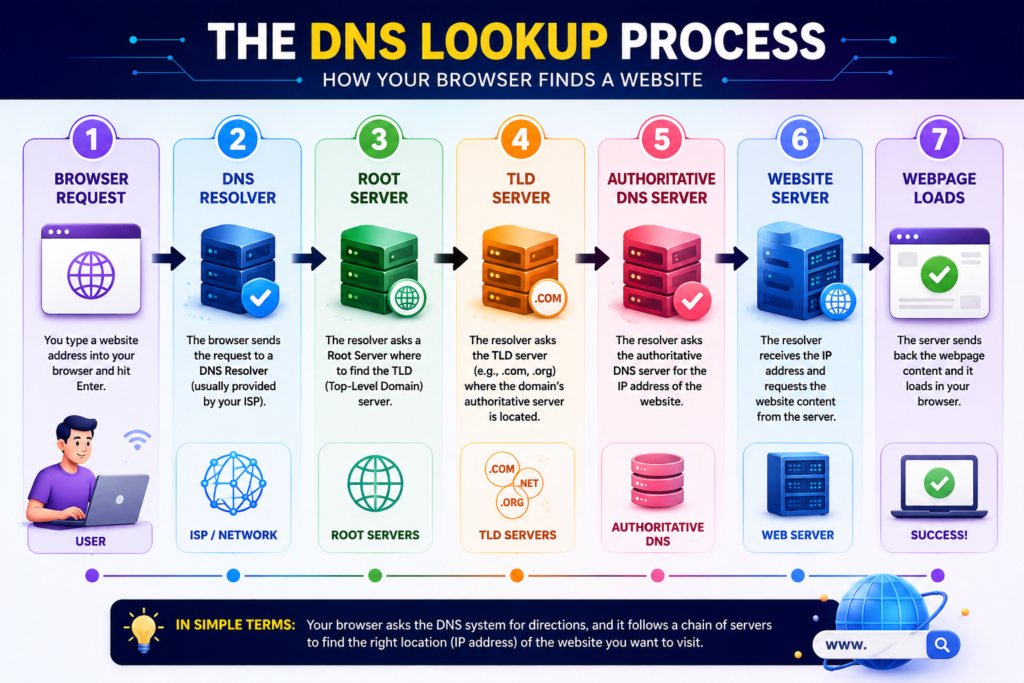
Every time you open a website, several systems work together within milliseconds.
Although the process is highly technical, the basic workflow is surprisingly simple.
When you type a domain name into your browser, your computer first checks whether it already knows the correct IP address from a recent visit.
If not, it begins a DNS lookup.
Your internet provider or selected DNS service receives the request and begins searching for the correct answer.
The resolver contacts one of the internet’s root DNS servers, which helps identify the correct top-level domain, such as .com, .org, or .net.
The top-level domain server points the resolver toward the authoritative DNS server responsible for the requested domain.
This server stores the correct DNS records and returns the website’s IP address.
Using the IP address it received, your browser connects to the website’s server and begins loading the page.
The entire process usually takes only a fraction of a second, which is why most users never notice it happening.
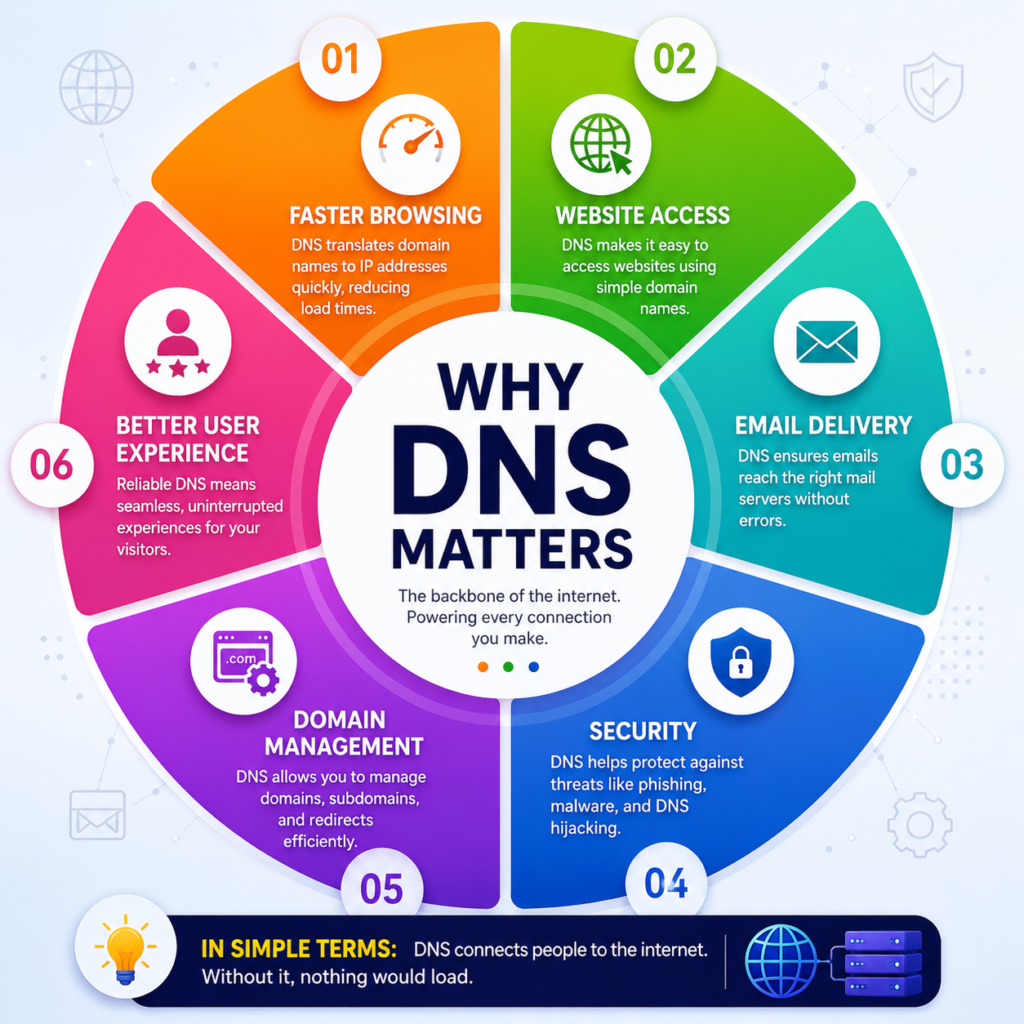
Many people think DNS only helps open websites, but it plays a much bigger role in how the internet functions.
DNS helps:
Without DNS, the internet would be significantly less user-friendly.
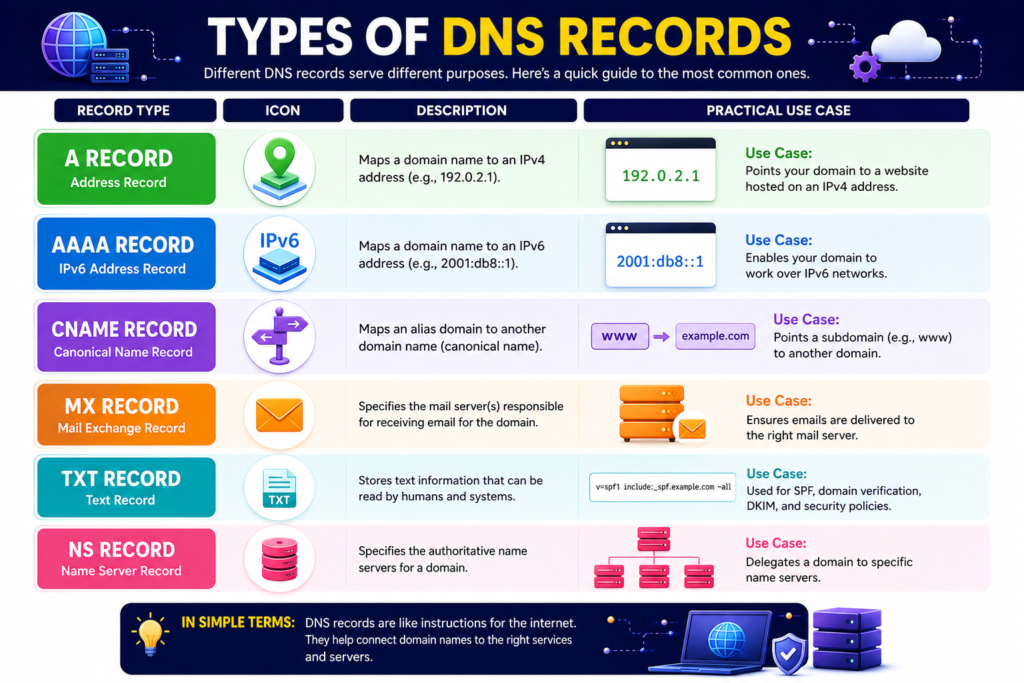
Different DNS records have different jobs.
The most common ones include:
| DNS Record | Purpose |
|---|---|
| A Record | Connects a domain to an IPv4 address |
| AAAA Record | Connects a domain to an IPv6 address |
| CNAME | Points one domain to another |
| MX Record | Directs email to mail servers |
| TXT Record | Stores verification and security information |
| NS Record | Identifies authoritative DNS servers |
These records allow websites, email services, and other internet applications to function correctly.
DNS lookups would be slower if every request started from scratch.
To improve performance, browsers, operating systems, and DNS resolvers temporarily store recently used DNS information in a cache.
When you revisit the same website, the cached information is often used instead of performing a complete DNS lookup again.
This reduces loading times and decreases internet traffic.
DNS records are not stored forever.
Each record includes a value called TTL (Time to Live). This tells computers and DNS servers how long they can keep the information before requesting an updated version.
For example:
| TTL Value | What It Means |
|---|---|
| 5 Minutes | Information refreshes frequently |
| 1 Hour | Common for many websites |
| 24 Hours | Good for information that rarely changes |
A shorter TTL helps website owners make updates faster, while a longer TTL can improve browsing speed by reducing repeated DNS lookups.
Not all DNS services are the same. Most people use the DNS servers provided by their Internet Service Provider (ISP), but many users switch to public DNS providers for better speed, reliability, or security.
| Feature | ISP DNS | Public DNS |
|---|---|---|
| Managed By | Internet Provider | Technology Company |
| Speed | Varies | Often optimized |
| Security Features | Basic | May include malware protection |
| Reliability | Depends on ISP | Usually high |
| Easy to Change | Yes | Yes |
Popular public DNS services include:
Each service offers different features, so the best choice depends on your needs.
DNS is not just about finding websites. It also plays an important role in internet security.
Modern DNS services may help block:
Businesses often use secure DNS services to protect employees from accidentally visiting harmful websites.
For website owners, correctly configured DNS records are also important for email authentication. Records such as SPF, DKIM, and DMARC help reduce email spoofing and improve email delivery.
Sometimes websites fail to load because of DNS-related issues. Fortunately, many of these problems are easy to fix.
| Problem | Possible Cause | Simple Solution |
|---|---|---|
| Website not opening | DNS server unavailable | Try another DNS provider |
| DNS error message | Incorrect DNS cache | Clear the DNS cache |
| Slow website loading | Slow DNS response | Switch to a faster DNS service |
| New website not visible | DNS propagation | Wait until propagation completes |
| Email not working | Incorrect MX record | Check DNS settings |
Many DNS issues are temporary and resolve automatically after a short time.
When a website owner changes DNS settings, the update is not visible everywhere immediately.
This delay is called DNS propagation.
During propagation:
Propagation usually finishes within a few hours, although in some cases it may take up to 48 hours.
This is completely normal and does not usually indicate a problem with the website.
Whether you’re a regular internet user or a website owner, these tips can help you use DNS more effectively.
Choose a reputable DNS service that offers good performance and security features.
Website owners should double-check every DNS record before saving changes, as a small mistake can make a website or email service unavailable.
If you manage a business website, regularly review your DNS security records to help protect your domain and email system.
If a website isn’t loading correctly after recent changes, clearing your DNS cache can sometimes solve the issue.
Website monitoring tools can quickly alert you if DNS problems prevent visitors from accessing your site.
Many beginners misunderstand how DNS works. Avoid these common mistakes:
Understanding these basics can help prevent unnecessary website downtime.
DNS is a system that converts easy-to-remember website names into IP addresses so computers can locate websites on the internet.
DNS allows people to browse websites using domain names instead of remembering long numerical IP addresses.
Yes. Most computers, smartphones, and routers allow you to use a different DNS provider if you prefer.
No. A domain name is the website address you type, while DNS is the system that translates that name into an IP address.
Your internet connection may still work, but you might not be able to access websites using their domain names until DNS is working again.
It does not increase your internet bandwidth, but a fast DNS provider can reduce the time it takes to locate websites.
Well-known public DNS providers are generally considered safe, but you should always choose trusted services and review their privacy policies.
Yes. Secure DNS services can help block malicious websites, while properly configured DNS records help protect business websites and email systems.
Understanding What Is DNS is one of the first steps toward learning how the internet really works. Although most people never notice it, DNS quietly handles billions of requests every day, allowing users to access websites quickly and easily without memorizing complicated IP addresses.
Whether you’re a student learning networking basics, a blogger managing your own website, or a small business owner running an online store, knowing how DNS works can help you troubleshoot problems, improve website management, and make better technology decisions.
The next time you type a website address into your browser, you’ll know that an incredibly fast network of DNS servers is working behind the scenes to connect you with the correct destination in just a fraction of a second.
This article is published by Tivorenza.com to help readers understand technology in a simple, practical, and beginner-friendly way. We regularly update our content to keep information accurate and useful.


[…] A reliable Wi-Fi connection can reduce interruptions caused by weak network coverage. […]