

A letter arrives from a bank you’ve never used, thanking you for your new credit card. Then a bill for a phone contract you never signed. Then a debt notice for a loan you never applied for. Your wallet is still in your pocket and your phone is still in your hand — yet somewhere, someone is living a parallel financial life in your name. That’s identity theft: a stranger using your personal details to open accounts, spend money, or commit fraud as you. It feeds on ordinary habits — reusing a password, skimming a suspicious email on a busy morning. This plain-English guide explains what it is, how thieves get your details, the warning signs, what to do if it happens, and the habits that stop it.

What Identity Theft Really Means
Put simply: identity theft is when someone gathers enough of your personal information to pose as you. A full name, date of birth, address, phone number, ID number, or bank details — usually a combination of these does the trick.
What do they actually do with it? Almost always, it’s about money. Opening a credit card or loan in your name and spending it. Buying things online with your card details. Taking over your accounts by resetting passwords. Filing fraudulent benefit claims in your name.
Two ideas are worth keeping apart. “Account takeover” means a thief breaks into an account you already have — your email, your bank login, your shopping account. “New-account fraud” means they open accounts you never had. And one reassurance: having your details misused doesn’t mean you were careless. Company data breaches have leaked millions of innocent people’s details. The useful question isn’t “how could this happen to me?” — it’s “what do I do now?”
How Thieves Get Hold of Your Details
Criminals rarely steal identities the way films show it. Most of the time, they harvest the everyday information you leave lying around. These are the main routes they use.
The trick email, text, or call
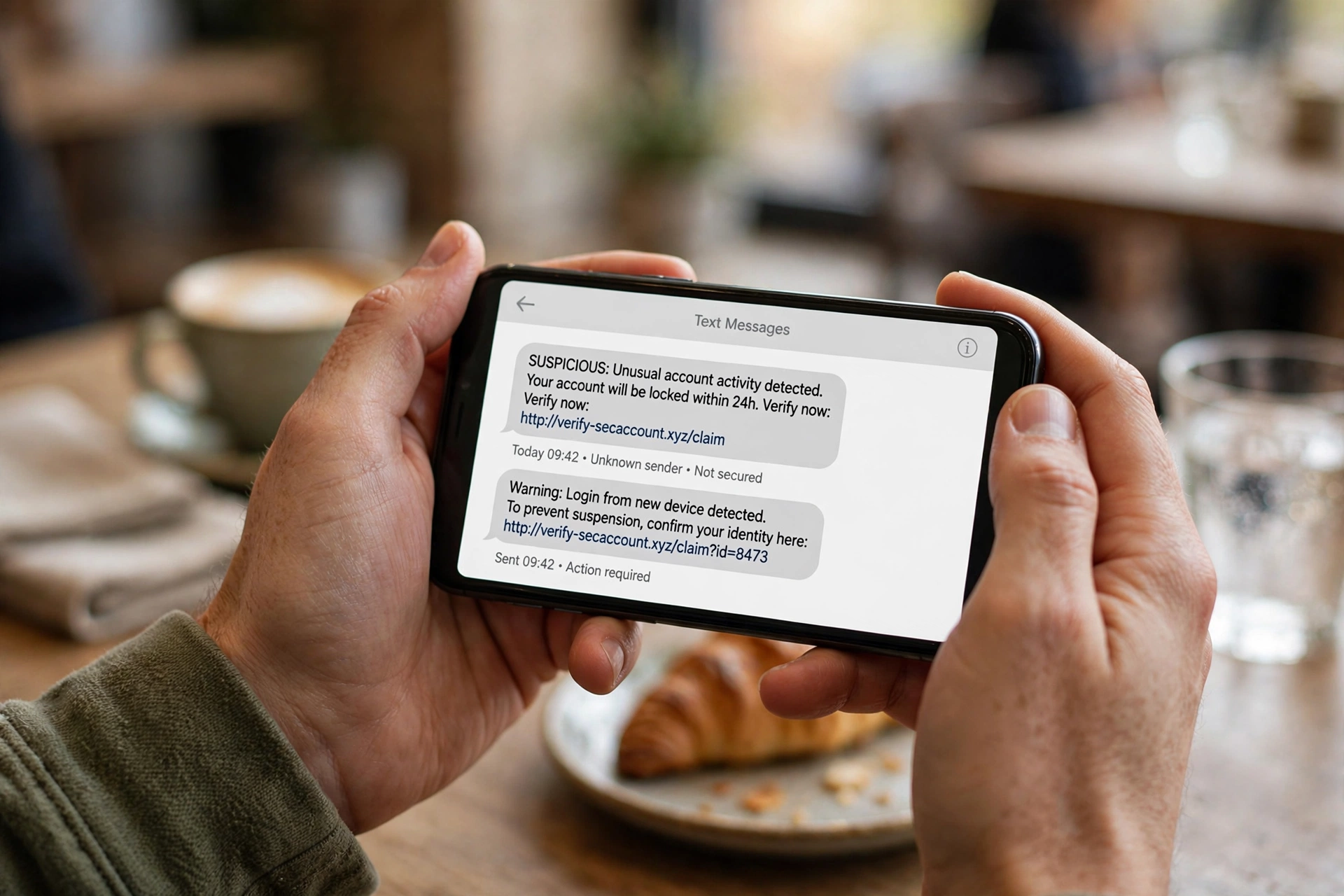
Phishing is the most common method — and the cheapest for the criminal. A message that looks like it’s from your bank or a delivery company warns that your account will be locked unless you “verify your details.” The link leads to a lookalike page that collects whatever you type. The classic tell is the panicked tone — “act within 24 hours” — because a calm person is a careful person.
Big data breaches you never heard about
Shops, banks, and apps of every size hold your details — and when one of them is breached, names, addresses, and sometimes passwords end up traded between criminals. This is the biggest reason never to reuse passwords: a breach at some small site you joined years ago can hand a thief the key to your bank account.
The paperwork you threw away
Old bank statements, medical letters, and tax documents tossed in the bin are a goldmine. A thief only needs a few pieces — name, address, date of birth, account number — to start building a false identity in your name. Shredding sensitive paper before you throw it away closes this door.
Public Wi-Fi and shoulder surfing
Unsecured public Wi-Fi in cafés, airports, and hotels can let a snooper on the same network see login details typed into insecure pages. Then there’s shoulder surfing — someone simply watching you type a PIN in public. Neither needs any special skill.
The Warning Signs Most People Miss
Identity theft usually starts quietly. Thieves prefer slow, small moves that don’t trip any alarms. Keep an eye out for these:
- Bills or letters you don’t recognise — a “thank you for your application” letter from a company you never contacted is a red flag.
- Transactions on your statements that aren’t yours — even tiny ones. Thieves sometimes test a stolen card with a small purchase first.
- A sudden drop in your credit score — an unexplained dip can mean new accounts or missed payments you know nothing about.
- Being refused credit out of the blue — a rejection can be the first sign that your credit file holds someone else’s activity.
- Debt collectors calling about debts that aren’t yours — a fraudulent account may have gone unpaid long enough to be chased.
- Login alerts or password resets you didn’t trigger — someone may be probing your accounts right now.
- Mail going missing — a thief may have diverted your post to intercept new cards or documents.

None of these proves identity theft on its own — banks make mistakes, and credit files can lag behind. But anything you can’t explain deserves a closer look. Check your statements and credit report once a month.
What to Do Right Away If It Happens to You
If you suspect your identity has been misused, take a breath — this is fixable. Work through these steps in order, and keep a written record of everything: dates, names, reference numbers, copies of letters.
1. Contact your bank or card provider’s fraud team. Tell them exactly what you noticed. They can freeze or replace cards, reverse fraudulent transactions, and add security notes to your accounts. Use the number on the back of your card — never the number in a suspicious message.
2. Secure your accounts. Change the passwords on the affected accounts and on any account sharing the same password, and switch on two-factor authentication. If your email was compromised, fix that one first — your inbox is the reset key for almost everything else.
3. Check your credit reports. Request your files from the credit bureaus where you live and scan them for accounts, applications, or addresses you don’t recognise. Dispute anything unfamiliar in writing — and ask for the result in writing too.
4. Ask about a fraud alert or security freeze. Most credit bureaus let you place a fraud alert, which tells lenders to verify your identity extra carefully before opening new accounts in your name — or a freeze, which blocks most new credit checks outright.
5. Report it to the police or the relevant authority. A formal report creates a record that protects you if the fraud resurfaces, and some banks and bureaus ask for a report reference. Keep a file of everything: dates, names, reference numbers, copies of letters and emails.
One thing worth knowing: you’re generally not legally responsible for fraudulent debts taken out in your name. Getting them removed takes persistence and paperwork — but in most countries, the law sides with the victim.
Everyday Habits That Make You a Harder Target
Use strong, unique passwords and two-factor authentication. Every account gets its own password — a password manager can remember them all for you. Add a second verification step on your email, bank, and social accounts at minimum. This single change defeats most account-takeover attempts.
Verify before you click. If a message claims to be from your bank or a government body, don’t touch its link. Open the official app, or type the official address yourself. Ten extra seconds defeats nearly all phishing.
Shred sensitive documents. Bank statements, medical letters, and anything carrying an account or ID number should go through a shredder, not straight into the bin. Cut old cards through the chip and the strip.

Share less, lock down more. Set social media so your posts and personal details are visible to friends, not the whole internet. Skip the “fun quizzes” asking for your pet’s name or first school — those answers are security-question answers.
Keep devices and apps updated. Updates frequently close the security holes criminals exploit. Switch on automatic updates and install them promptly.
Be careful on public Wi-Fi. Avoid banking or shopping on open networks — and log out fully afterwards.
None of these habits is dramatic. That’s the point. Prevention isn’t one clever trick; it’s being consistently a little harder to fool than the average person.
Quick Answers for Worried Beginners
Can someone steal my identity with just my name and address? Usually not enough on its own. Thieves normally need a combination — a date of birth, an ID number, account details, or a password. Still, a name and address are a starting point, so they’re worth guarding.
Should I worry if a company I use had a data breach? Take it seriously, but don’t panic. Change your password there, make sure you weren’t reusing it anywhere else, and keep an eye on your statements for the next few months.
How long does it take to sort out identity theft? A single fraudulent card transaction can be cleared up in days. New-account fraud spread across several companies can take weeks or months. The earlier you spot it, the shorter the whole process.
Will it ruin my credit score forever? No. Fraudulent entries can be disputed and removed. It takes paperwork and patience, but credit scores recover once the fraudulent items are gone.
Is identity theft only an online problem? Not at all. Paper documents, phone calls, mail theft, and eavesdropping still account for many cases. Shredding, noticing who’s behind you at the ATM, and keeping your post secure matter just as much as digital habits.
Small Habits, Stronger Defenses
Here’s the honest truth: you can’t make yourself an impossible target, and you shouldn’t try. What you can do is make yourself an inconvenient one. Unique passwords with two-factor authentication. A skeptical eye on unexpected messages. Shredded documents. A monthly glance at your statements and credit report. Together, these cover nearly every route a thief takes. And if something does go wrong, the fix is well-worn: banks, credit bureaus, and the authorities deal with this every single day. Report early, keep records, and work through it one step at a time.














